Robotics Project

Yahboom Micro:Bit Robot

Fully programable robot with many sensors and capabities!

Project:
Introduction & Description


The purpose of this challenge was to create an educational application or lesson of a chosen robotics platform for implementation as a lesson or unit in to support my content standards for computer science.

My goal was to create lessons for a robotics unit that was meaningful and real-world for my students and not just a novelty activity. For this challenge I chose the Micro:Bit Smart Robot made by the Yahboom company.

For the past few years, I have been looking into adding a robotics unit into my course as a means to bring programming or coding from out behind the computer screen and into the physical world. I believe that using the Micro:Bit Smart Robot will allow me to create a physical computing experience which could be very helpful for my students who struggle with the abstract and confusing computer programming commands, constructs and processes of writing and creating programs on the computer. It is my hope that when my students work with, and program the robots in the physical world the difficult abstract programming concepts and constructs will become more concrete and understandable while creating a fun, yet exciting, innovative, and highly engaging lesson activity. Furthermore, I would like to incorporate the aforementioned robotics unit as a way to move my students from block-based languages to a more traditional text-based language, such as JavaScript or Python, by using simple to advanced robotic problems and projects to provide a scaffold between the two types of languages and language editors.

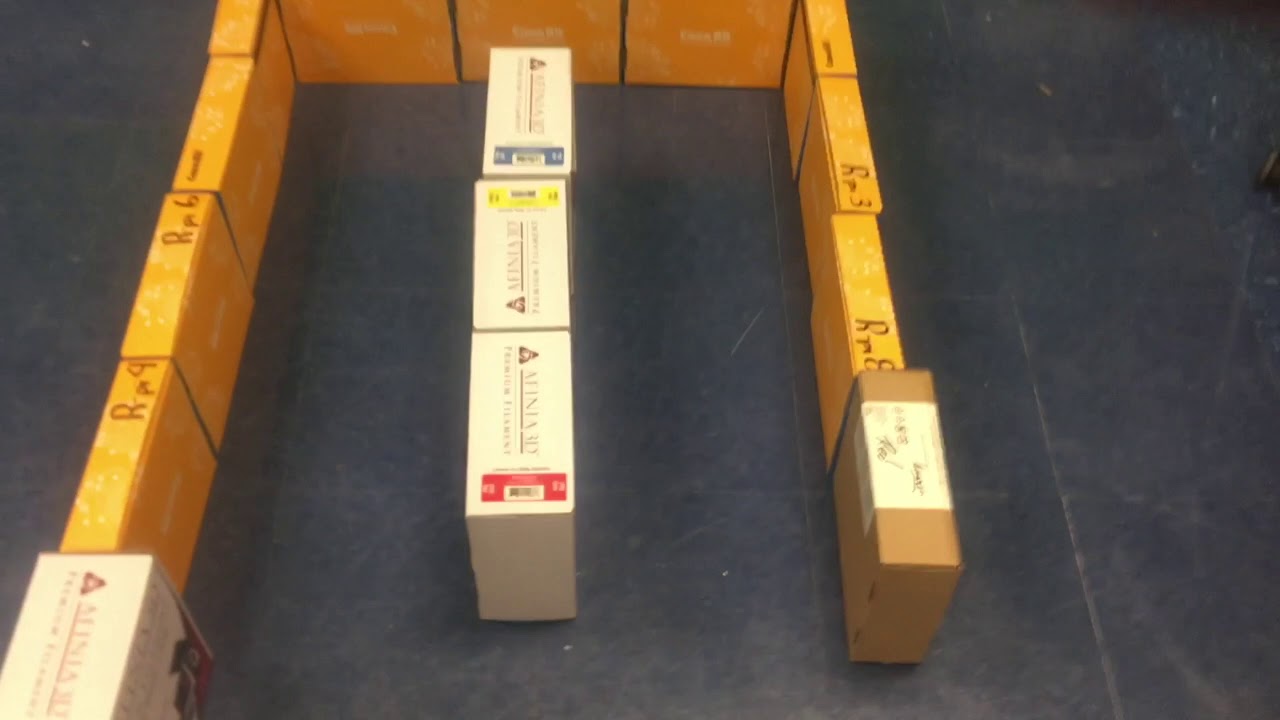
The project and unit I decided to create for my students was to learn how to program the Micro:Bit Smart Robot to autonomously navigate a maze or avoid obstacles that were placed in the robots path.

Computer Science: Purpose


Robotics is about system integration, achieving a task by an actuated mechanical device, via intelligent integration of components and programming. A robot is the component that implements this interaction with the physical world based on sensors, actuators, and information processing. Robotics deals with the design, operation, and use of robots and computer systems utilizing their control, sensory feedback, and information processing.

This purpose of this unit is:

  1. To expand students programming skills into the world of physical computing by programming robots to complete challenges and tasks.
  2. To bring computer programming out of the computer and digital world into the real world of physical computing.
  3. To motivate students to learn more about the problem-solving process and logical thought process of programming.
  4. To challenge the students to think logically to breakdown real-world problems and challenge assignment tasks to increase their learning potential.
  5. To encourage students to see how Computer Programming can extend beyond computers into other areas and domains.
  6. To experience the cross curricular sub domain of robotics inside the computer science classroom.

This Unit will allow students to further develop and refine additional programming skills utilizing prior knowledge and experience that have been obtained in Scratch and App Inventor. The students will be able to view the physical manifestations of their programs in the context of the real-world as their robots execute their programs.

The students will work in groups of 2-3 and learn about the different types of sensors and capabilities of the Micro:Bit robot and how to program said robot to perform and complete different tasks.

In this Unit the students will use the Micro:Bit MakeCode programming interface. This will allow the students to see their code in a graphic puzzle-like way so they can focus more on the thought process and the logic of how to create a program to complete a task, rather than learning the complex syntax and semantics of a specific programming language.


Computer Science: Standards


Every great lesson starts with addressing the standards that that lesson or unit is going to cover.

Here are the following standards that this productions application covers and supports.

This lesson is aligned with the 2018-2019 Nebraska CTE Course Standards and Programs of Study - Middle-Level Courses for Communication and Information Systems: Introduction to Computer Science (270411)

Standard 3 - Computational Thinking
  Indicator 3.2 - Use the steps of computataional thinking to solve a problem. (Decompose,
                               Patterns, Abstraction and Algorithms.)
Standard 4 - Algorithms and Programing
  Indicators 4.4 - Employ pair programming to design, write and debug a program that
                                 accomplishes a specific goal
  Indicators 4.5 - Using a programming language, design and develop a program that uses basic
                                 programming concepts (loops, conditionals and procedures) to solve a                                           problem.
 
                                                                                     (Nebraska Department of Education, 2018)


Unit Overview

Lesson Lesson TItle Duration
Lesson 1Intro to the Micro:Bit Robot – Basic robot movement             One Class Period
Lesson 2Micro:Bit Robot – ShapesOne Class Period
Lesson 3Micro:Bit Robot – ArtBotOne Class Period
Lesson 4Micro:Bit Robot – Traffic LightsOne Class Period
Lesson 5Micro:Bit Robotic – Singing
(Intro to sound and audio feedback)
One Class Period
Challenge ActivityRobot - Sing and Dance
Combines concepts from lessons 1-5  
Two Class Periods
Lesson 6Micro:Bit Robot – Full Light ControlOne Class Period
Lesson 7Micro:Bit Robot – Colorful Search LightOne Class Period
Lesson 8Micro:Bit Robot – Line FollowingOne Class Period
Lesson 9**
Product lesson
Micro:Bit Robot – IR Sensor (Avoid Obstacles 1)One Class Period
Lesson 10Micro:Bit Robot – Ultra Sonic Sensor (Obstacle avoidance 2)One Class Period
Challenge Activity 2Robot – Escape the Maze or Obstacle Avoidance Course
Combines concepts from lessons 1-10

Two Class Periods

Project Materials

If you want to recreate my unit and lessons, here is a list of what I used and where you could find the materials if you don't already have them. This materials list will assume you have a assess to everyday classroom items like books, boxes, cardboard to create the mazes and obstacle courses for the robots.
If you don't, you can just use the boxes that the robots ship in!

All robots can be ordered through Amazon.com

For this project I utilized paired-programming so I only needed to purchase ten (10) Micro:Bit Smart Robots. Please noted that the robot are available with the Micro:Bit included or without, which, in that case they would be needed to be purchase separately. In the chart below I have included the Robots without the Micro:Bit to more clearly reflect total project cost.

Additional resources for a success project, not included in the chart below; 

  • Students will need access to a computer or computer lab with Internet access to program the Micro:Bit to cammond the robot.
  • Teachers should have privious experience with a block-based langange use as Scratch or SNAP!
  • The program use program the robots is web-based (MakeCode, https://makecode.microbit.org/) so there is no need to install any software, hardware drivers or plug-ins.
  • No additional support or approve is needed from my building or district due to all of the software and robots are on our approved technology list. I will not need any help, aid or permission in installing of any additional software needed for the application.
  • Additional resourses - Students will be working collaboratively on their robotic lessons so access to a large room for the maze and running of the robots is desirable and a plus, but not needed. Our hallway worked for this purpose.
  •  Any additional materials - needed to build a maze or obstacle course, mentioned previously. 

ItemItem Number
Vendor Item Cost QuantityCost
Yahboom Micro:Bit
Robot
B07FKYFD4WYahboom
(through Amazon)
$52.9910$529.00
Micro:Bit Shield
(SBM)
BBC2546862BBCBBC
(through Amazon)
$19.0010$190.00
Extra USB Charging/
Data cables
micro usb cord 6FTSMALLElectric
(through Amazon)
$9.994$39.96
    Total Cost$759.86

Project: Operation

The assembly portion for this project will be broken down into two parts. The first part will be the the Smart Robot itself, followed by programming of the robot.

Robot Video
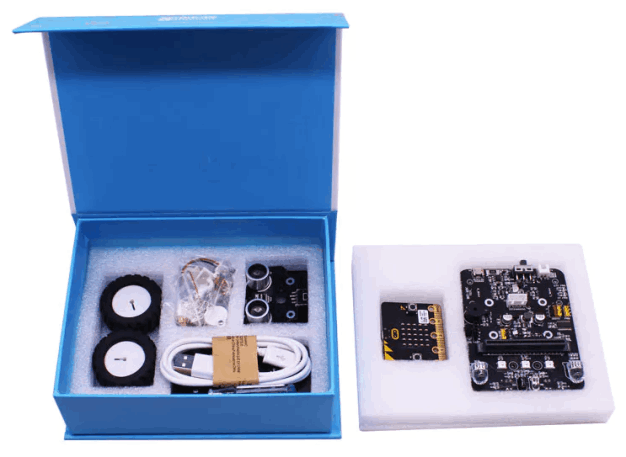
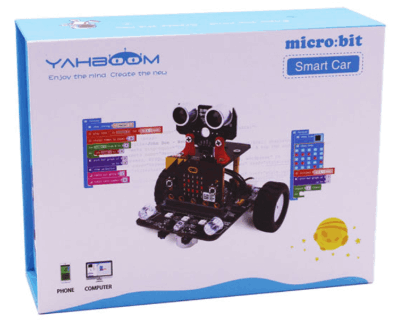
Smart Robot Box Image. Retrieved from http://yahboom.net/study/Bitbot. Copyright 2018 by Shenzhen Yahboom Technology Co., Ltd.

Smart Robot Details

     ...assembly required!

The Micro:Bit Robot by Sechenzen Technologies is a small programmable robot which combines the programming power/ability of the Micro:Bit as the core controller with a small and compact the robot body at $52.99 per robot combined with a $20.00 Micro:Bit the total robot package it is relatively inexpensive.

The robot is package as a kit and takes about 20-25 minutes to assemble. Assembley is pretty fast and painless requiring a Phillips screwdriver which is provided.

Installation documents can be downloaded from here. - Micro:Bit Smart Robot Files

Smart Robot Assembly Instructions

Retrieved from http://yahboom.net/study/Bitbot.
Copyright 2018 by Shenzhen Yahboom Technology Co., Ltd.

Smart Robot Packaging

Retrieved from https://www.hackster.io/techarea98/yahboom-micro-bit-smart-car-89ac31.
Copyright 2018 by Shenzhen Yahboom Technology Co., Ltd

Smart Robot Sensors

Robot SBM
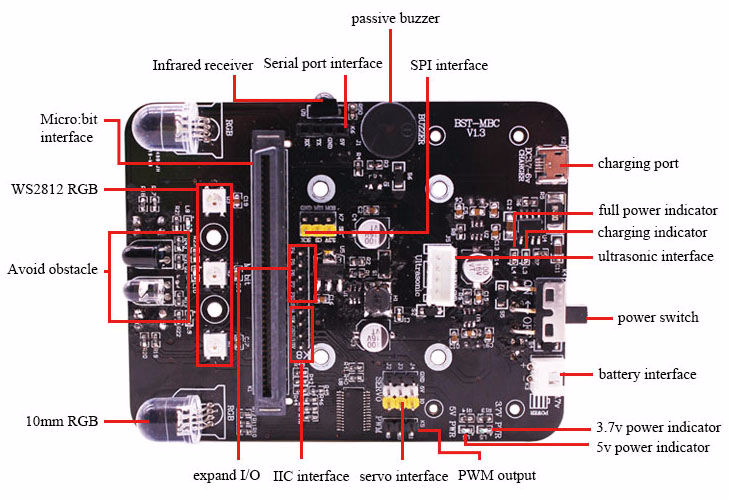
Robot SBM board. Retrieved from http://yahboom.net/study/Bitbot. Copyright 2018 by Shenzhen Yahboom Technology Co., Ltd.

Multiple Programming Sensors

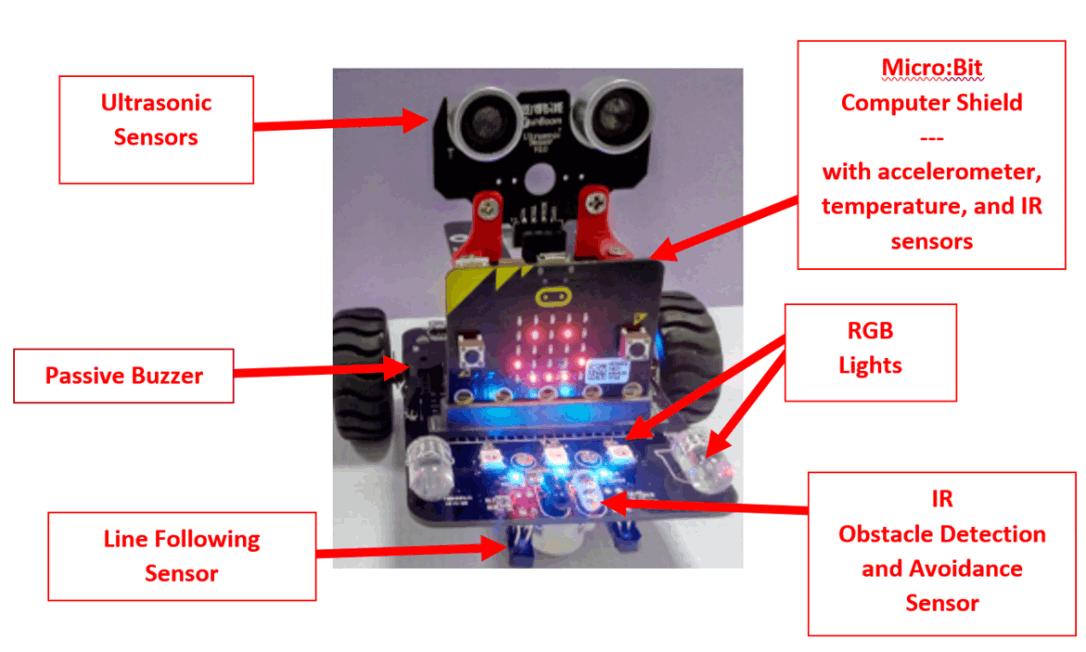
The Micro:Bit is fully programmable and expanadable! Students can program speed, direction, several LED lights. It also has many programmable sensors as is capable of line following, Infrared (IR) and ultra sonic sensors for a variety of learning activities. These sensors can be combined with the on-board sensors built-in to the Mircro:Bit for fuether activities

Mirco:Bit Robot sensors created by Randall Henderson.
Image retrieved from http://yahboom.net/study/Bitbot.

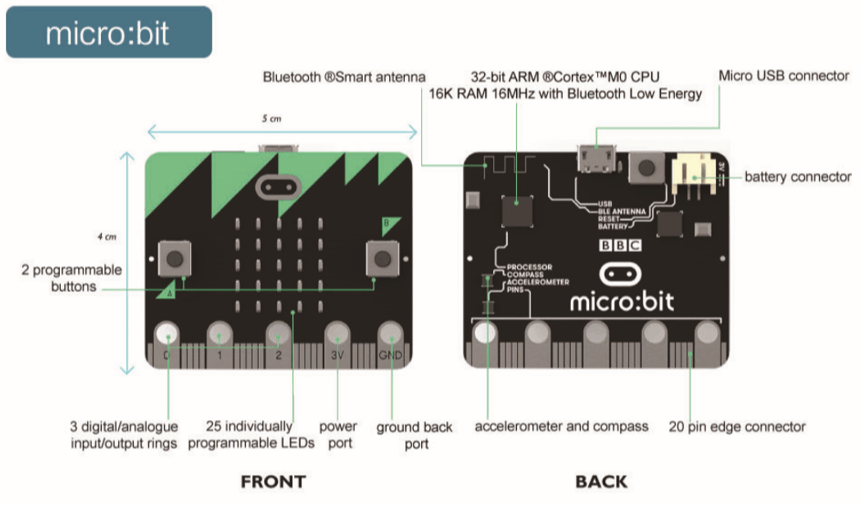
Micro:Bit shield/controller. Retrieved from http://yahboom.net/study/Bitbot/manual. Copyright 2018 by Shenzhen Yahboom Technology Co., Ltd.

Smart Robot Programming

Mobirise

Easy and Simple to Program

The Micro:Bit Smart Robot operates on the most popular educational block and text-based programming languages including Scratch and MakeCode.

For project my class utilized the MakeCode programming environment. In the future we plan on using the Python programming language as a way to introduce text-based proraming to my students.

Mobirise

Programming

There are several different languages you can use to program the Micro:Bit Smart Robot. This should be based on your level of expertise and comfort with varying programming languages. I chose to use the MakeCode programming environment.

The nice think about MakeCode is that it is very similar to Scratch which all of my students have had experience with and it is simple and takes very little time to learn how to use.

There are special commands build into the environment specifically for programming the Micro:bit and Robot.

At the bottom of the page, you will find a link to download code that  was created as part of this project.

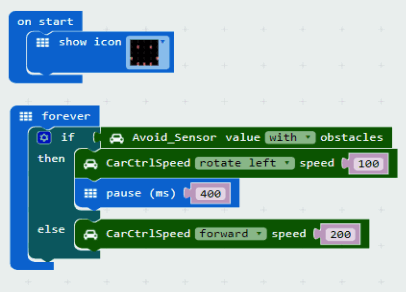
My students had fun creating the basic program that allow the Robot to "sense" or see and object and then avoid it. The image to the left is a screenshot of how the "blocks" fit together to accomplish this. This is just the basic or started code or you can download the hex file at the bottom of the page and import it on theMakeCode website and expand your own robot program.

Video and Product Demostration


File Resources
Click on files icons to download the MakeCode .hex program. These programs can be imported back into and modified in MakeCode 

Product
Reflection and Evaluation


robot imageMy favorite part about this challenge was combining the Micro:Bit SBM with the Smartbot Robot platform. This allowed the students to see how a piece of technology like the Micro:Bit can be used and extended for further fun and educational purposes. Also, the students has a fun learning how to program the robot. From the simple commands of forward, backward, turn right and left to making the robot follow a line the programming part of the class came alive and fun! The students were always experiementing with their programs and code and even each other as the drive to be able to make their robots do something new was endless and fun and really drove the students' learning.

Additionally, my students loved creating and setting up obstacle courses and mazes from simply everyday classroom objects for their robots to navigate through. At times it seemed a bit chaotic but I feel that is when thereal learning was occurring

Reflection of project's achievement of goals related to the Nebraska STEM Instruction Rubric

My Micro:Bit robotics application unit Models Excellence for not only covering all of the content standards defined by the Nebraska Department of Education for middle level courses – Introduction to Computer Science, but also for integrating concepts across multiple content areas including Common Core Standards for language arts, math, and the Nebraska Science standards. The lessons in my robotics unit combined with the Micro:Bit robot platform provided an excellent interdisciplinary integration that created a setting where the use and understanding of topics, concepts and ideas from Science, Technology, Engineering, Math could occur in a natural, real-world way in the robotic lessons.

Furthermore, the Robotic application and unit Models excellence in meeting and supporting all of the standards from the Nebraska Department of Education Standards for Middle Level - Introduction to Computer Science. All of the lessons for the Micro:Bit smart robot were standards-based and aligned in an effort to help my students acquire competency in the recognized, grade-appropriate standards of computational thinking and computer programming skills and knowledge.

This application also Models Excellence in the area of learner-centered activity and first-hand experience as defined by the Nebraska STEM Instructional Resource Rubric. In all of the lessons, the students were asked to work collaboratively with their peers in small groups in a hands-on robotics application to define, plan, develop and create the code to get their robot to complete a specific task or solve a specific problem. The individuals in the student groups shared all of the planning responsibility in the activity and often had communicate to work together and experiment with variations of the of their robot programs to achieve the desired outcome or solution. Even though students worked collaboratively in groups each group member was responsible for being able to create and explain their own or the groups logic and program to others.

The Micro:Bit Smart robotics application Models Excellence because it promotes critical thinking, creativity, collaboration and communication (4C) skills through STEM in a school-based application. All of the lessons in the robotics application unit encouraged and required students to use critical thinking skills, creativity, collaboration and communication to plan, develop and then apply and use technology to create programs so their robots could perform the given tasks or solve a given problem. Additionally, science was integrated in to the lessons in the discussion of sensors and capabilities of the robot. Students groups would use the engineering design and problem-solving process to collaborate and effectively communicate their ideas to define the problem and prepare solutions. Additional communication skills were demonstrated through a written reflection component of each assignment where students were asked to explain their design process. This reflection should not only include not just their successes but also their failures, as failure is also very valuable part of the learning process.

References


Chen, B., Grandgenett, N., & Goeman, R. (n.d.) Educational Robots Wiki. Retrieved 
          January 14, 2019,https://sites.google.com/view/educational-robotics/project
          ideas. >CEENBOT/TEKBOT Site (n.d.) CEENBoT Resources. Retrieved January
          15,2019, from http://ceenbot.unl.edu/ 

Computer Science Teachers Association (2017). CSTA K–12 Computer Science
          Standards, Revised 2017. Retrieved January 14, 2019, from
          http://www.csteachers.org/standards. 

Grandgenett, N., Ostler, E., Topp, N., & Goeman, R. (2014). Robotics and problem-based
          learning in stem formal educational environments. In K-12 Education: Concepts,
          Methodologies, Tools, and Applications (Vol. 1, pp. 463-488). IGI Global.
          https://doi.org/10.4018/978-1-4666-4502-8.ch02 

Nebraska Department of Education. (n.d.). 2018-2019 CTE course standards and       
          programs of study. Middle-Level Courses: Introduction to Computer Science,
          270411 [PDF file]. Retrieved January 22, 2019, from   
          http://cestandards.education.ne.gov/Courses/270411_Middle%20School%20
          Computer%20Science.pdf 

Yahboom Robot. (n.d.). Retrieved January 23, 2019, from
          http://www.yahboom.net/study/BitBot

Yahboom Robot Hardware. (n.d.). [Graphic illustration of Micro:Bit robot circuits].
          Micro:Bit schematics circuit diagram. Retrieved January 23, 2019, from
          http://www.yahboom.net/xiazai/Microbit%20robot/robot_car_schematic.rar


Address

3802 Reddick Ave
Omaha, NE 
68112

Contacts

Email: Randall.Henderson@ops.org         
Phone: 531-299-8922                     
School: 531-299-2440